If you don’t know what Homebrew is, I’ll provide a short rundown. Homebrew is essentially a package management system for Mac, although it also works on Linux. It allows you to easily install many software packages, mostly designed to make installing open-source software easier, but you can now find plenty of proprietary software packages through Brew as well.
If you’ve done much experimenting with open-source or command-line software on a Mac, there’s a good chance you’ve run into Homebrew. Software wikis often tell you to install Brew and then use it to install the software.
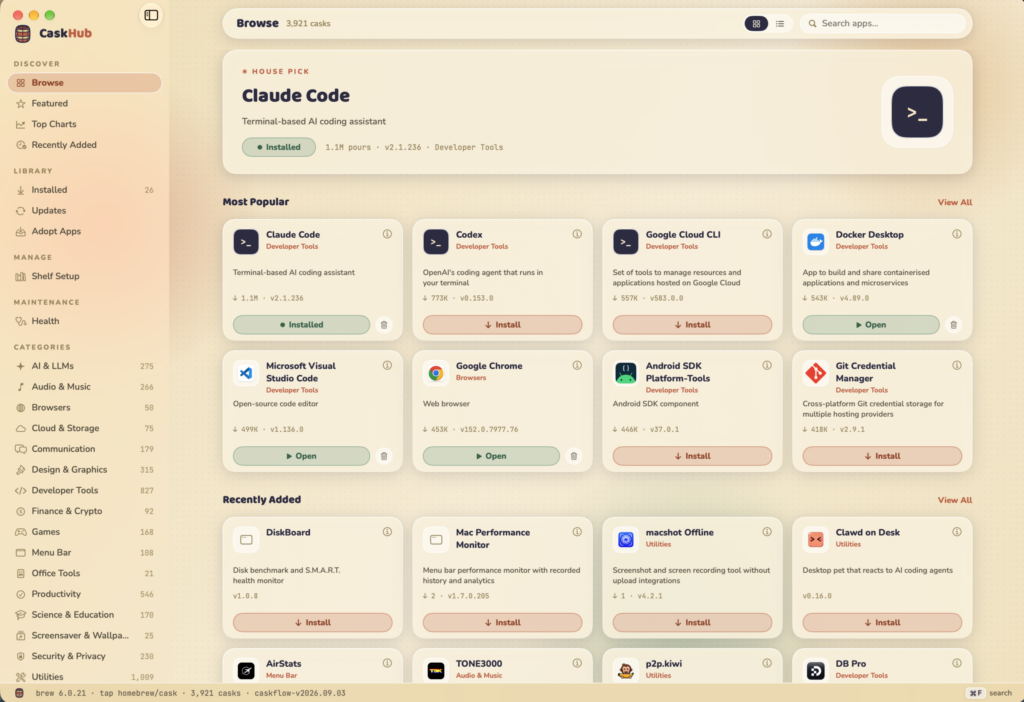
What I hadn’t discovered until recently was a GUI interface developed on top of Homebrew that operates a lot like the Mac App Store. Say hello to CaskHub. I’ve been running CaskHub on my systems for a couple weeks now, and I’ve fallen in love with its simplicity, so I wanted to bring it to my GeekKnight family.
If you’ve ever used Linux, you’re probably familiar with the package managers and software centers many distros include to make installing software and Linux itself more approachable to new users, especially those coming from Windows. Some distros even build their own software management systems around this idea. CaskHub is basically that same concept, except for Mac.
This gets you out of the Terminal and makes installing and uninstalling software much easier, and here I’ve been using Brew in the Terminal for years like a caveman.
CaskHub automatically detects Homebrew apps you’ve already installed through the Terminal and lets you manage them directly from the GUI. It can also detect compatible apps you’ve installed outside of Homebrew, such as from a manually downloaded DMG, and allows you to “adopt” them into Homebrew so they can be managed there going forward.
If you’re already using Homebrew, then I highly recommend giving CaskHub a try. If you’ve never used Homebrew, then this is your easy entry into the world of open-source software. Give it a download, and maybe you’ll find a software package that solves one of your problems or even helps remove a recurring bill for paid software you currently use.
You can check out CaskHub by heading to this link: https://caskhub.app
Or, if you just want to go ahead and test-drive it yourself, open Terminal and type:
brew install --cask caskhub
I also want to give a shoutout to the YouTube channel Mostly Mac for bringing this to my attention. You can view their video on CaskHub:
Guestbook
Be the first to sign in.